Switches

- ARISTA DCS-7050TX-64-R Rackmount Managed Switch with 48x 10G RJ45 & 4x 40G QSFP+ Slots
- 1 in stock
- IBM SAN96B-5 Enterprise Bundle Rackmount SAN Switch with 96x 16G SFP+ Slots (72x Slots active) - 2498-F96
- 2 in stock
- DELL EMC PowerSwitch N1148T-ON Rackmount Switch with 48x 1G RJ45 Ports & 4x 10G SFP+ Slots
- 1 in stock
- HPE FlexFabric 5900AF High Performance Switch with 48x 1G RJ45 Ports & 4x 10G SFP+ & 2x 40G QSFP+ Slots - JG510AR
- 2 in stock
- HPE FlexFabric 5710 Rackmount Switch with 24x 10G SFP+ & 6x 40G QSFP+ / 2x 100G QSFP28 Slots - JL587A
- 1 in stock
- ARISTA DCS-7050QX-32S-R Rackmount Managed Switch with 32x 40G QSFP+ & 4x 10G SFP+ Slots
- 4 in stock
- HPE FlexNetwork 5130 Switch with 48x 1G RJ45 Ports & 4x 10G SFP+ Slots - JG934A
- 2 in stock
- ARISTA DCS-7010T-48-F Rackmount Managed Switch with 48x 1G RJ45 & 4x 10G SFP+ Slots
- 20 in stock
- HP CAMNet Global Partition Services Module (GPSM) for Superdome X Base Enclosure - AH337-60604 / AH337-67001
- 6 in stock
- DELL EMC PowerSwitch S5296F-ON High Performance Switch with 96x 25G SFP28 & 8x 100G QSFP28
- 1 in stock
- Fujitsu 5450 18/8 8 Gbit/s Fibre Channel Blade SAN Switch - Primergy BX400 / BX900 S1 - S26361-D2940-A100
- 1 in stock
- IBM 20-Port 4/8 Gbit/s Intelligent Pass-Thru BladeCenter Module - 88Y6413
- 1 in stock
- DELL EMULEX 24-Port 4G Fibre Channel Pass-Through Module - PowerEdge M1000E Enclosure - 0WR728 / WR728
- 1 in stock
- HPE Synergy 20G Interconnect Link Module - Synergy 12000 Frame - 785341-001 / 779218-B21
- 10 in stock
- DELL Brocade 4424 24-Port 4G Fibre Channel Switch Module - PowerEdge M1000E Enclosure - 0XK584 / XK584
- 2 in stock
- DELL Brocade M5424 24-Port 8G Fibre Channel Switch Module - PowerEdge M1000E Enclosure - 0F855T / F855T
- 1 in stock
- HPE SN6500B 96/96 Power Pack+ Rackmount SAN Switch with 96x 16G SFP+ slots (96x slots active) - 720964-001 / C8R42A
- 1 in stock
- HP Cisco B22HP Fabric Extender / Fibre Channel Modul - 8x SFP+ Ports - 708078-001 / 641146-B21
- 2 in stock
- Cisco SG300-28 Rackmount Fanless Switch with 28x 1G RJ45 Ports & 2x 1G SFP Slots
- 20 in stock
- HPE 6125XLG 10G/40G Ethernet Switch Module - BladeSystem BLc7000 / Superdome - 716102-001 / 711307-B21
- 8 in stock
Facts about switches in the network
- Professional switches for enterprise networks, data centres and edge sites
- Switch types and the differences in management
- Performance characteristics to consider depending on the area of application
- The integration of switches into existing infrastructures
- Advantages of refurbished switches at a glance
- FAQ: Frequently asked questions about network switches for professional use
- Buy refurbished switches at ServerShop24 at affordable prices
Professional switches for enterprise networks, data centres and edge sites
Switches form the backbone of every modern IT infrastructure. They control data traffic between servers, end devices and external networks – and largely determine the speed, reliability and security of communication. The choice of the right switch type depends less on the pure number of ports than on the specific network environment: a small office has different requirements from a data centre with a large number of servers or a decentralised production facility with industrial control systems.
Professionally refurbished used switches offer an economically attractive alternative to new equipment for most areas of application. The technology of established manufacturers such as Cisco, HPE-Aruba, Juniper or Dell delivers sufficiently high transmission rates even outside the latest devices, and after years still meets almost all requirements.
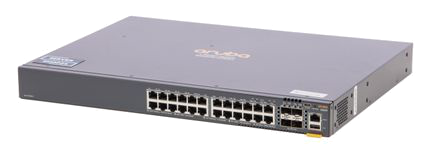
Switch types and the differences in management
The distinction between unmanaged, smart-managed and fully managed switches is fundamental for network planning. Not every deployment location requires full control over every packet – conversely, an overly simple switch can lead to bottlenecks or security issues in complex environments.
Unmanaged switches offer plug and play for simple structures
Unmanaged switches operate without a configuration interface. They automatically detect connected devices and forward data frames based on MAC addresses. This reduces administrative effort, but also limits control options. Typical deployment locations: small offices, home offices, simple workgroups or as a local extension behind a router. VLAN segmentation, QoS prioritisation or spanning tree protocols are not available here – which is acceptable in less complex environments, but in larger networks with more complex layer 2 structures can increase the risk of network loops or uncontrolled broadcast traffic.
Smart-managed switches as a middle ground with extended control
Smart-managed switches, occasionally also referred to as web-managed, offer a limited range of functions via a browser-based interface. VLAN configuration, basic QoS rules, port mirroring and link aggregation can usually be implemented – though without the depth of a command line interface or comprehensive automation APIs. This switch category is suitable for medium-sized businesses, branch office networks or as an access layer in less critical areas. The advantage lies in the ratio of functionality to price and complexity: administrators without specialised network certifications can implement typical requirements themselves here.
Fully managed switches allow full control for enterprise networks
Fully managed switches, also referred to as enterprise switches and in some models implemented as layer 3 switches, offer the full range of functions for complex network architectures. CLI access via SSH, SNMP monitoring, advanced routing protocols (OSPF, BGP, VRRP), dynamic VLAN assignment via 802.1X, DHCP snooping, ACL-based security policies and zero-touch provisioning for large rollouts are part of the extended feature set on many enterprise platforms. These enterprise switches are indispensable in data centres, in software-defined networking approaches or in environments with strict compliance requirements. Investing in refurbished managed switches in this category is particularly worthwhile: hardware lifespan often exceeds the technological utilisation cycle, so that devices two to three generations old still meet current requirements.
Specialised switch variants for special requirements
In addition to the management layer, there are further differentiations that become relevant for specific deployment scenarios:
PoE switches (Power over Ethernet) supply end devices such as IP telephones, access points or cameras directly via the data cable. The distinction between PoE, PoE+ (802.3at) and PoE++ (802.3bt) is crucial for the maximum available power per port – a 60-watt access point cannot be operated with classic PoE. When planning, it is important to consider the overall budget of the switch: not all ports can be supplied simultaneously with full PoE power.
Layer 3 switches integrate routing functionality at hardware level, enabling communication between subnets without a separate router. In large networks, this reduces latency and simplifies the topology. The boundary to the classic router is deliberately blurred here – modern Layer 3 switches additionally support functions such as policy-based routing or tunnel protocols, depending on the platform.
Fibre Channel switches serve exclusively for storage network connectivity (SAN) and operate with dedicated Fibre Channel protocols rather than classic TCP/IP-based Ethernet. They cannot be combined with Ethernet switches, but form dedicated infrastructures for block storage access. Refurbished Fibre Channel switches allow cost-effective expansion or increased redundancy of existing SAN environments.
Industrial Ethernet switches are designed for harsher environments: extended temperature ranges, protection against vibration and shock, redundant power supplies and special enclosure protection classes characterise this switch category. Deployment in manufacturing plants, traffic engineering or power distribution requires certifications that office hardware does not possess.
Performance characteristics to consider depending on the area of application
The raw port count says little about actual network performance. Decisive factors are those that only become visible under load:
Backplane bandwidth and switching capacity determine whether all ports can operate simultaneously at full speed. A 48-port Gigabit switch with an insufficient backplane behaves under full load like an overloaded roundabout – theoretically all connections are present, but in practice bottlenecks form.
Buffer sizes and latency influence the quality of real-time applications. Voice over IP, video conferencing or industrial control protocols are sensitive to jitter and delayed packets. Enterprise switches benefit here from dedicated hardware queues and precise QoS implementations.
Stacking and virtualisation capabilities allow multiple physical switches to be combined into a single logical unit. This simplifies management, increases redundancy and enables seamless port-spanning traffic without Spanning Tree blockages. Modern implementations such as Cisco StackWise, HPE IRF or Juniper Virtual Chassis were already mature in older generations.
The integration of switches into existing infrastructures
The physical integration of rack switches into existing infrastructures requires more than just free rack units. Power consumption, cooling, cable management and accessibility for maintenance must also be taken into account. Refurbished switches from established manufacturers offer planning certainty here: consumption values and requirements for optimum operation are documented, and spare part availability is guaranteed for years.
For cabling, the distinction between (RJ45) (copper ports) and SFP/SFP+ (for fibre optic, DAC or RJ45 transceivers) is relevant. Copper is affordable and sufficient for short distances within the rack; fibre optic enables greater reach, galvanic isolation and high bandwidths over longer distances. Many switches combine both media, with the SFP ports often serving as uplink connections to core switches or routers. The flexibility to choose between fixed 10G copper ports and modular SFP+ slots allows budget allocation to be tailored to specific requirements.
Advantages of refurbished switches at a glance
- Established enterprise features without the premium price of new equipment
- Proven firmware stability and mature technology
- Compatibility with existing management tools and automation frameworks
- Professionally tested and reliable
- Sustainable extension of the service life of high-quality networking hardware
- Short-term availability and long-term support cycle
FAQ: Frequently asked questions about network switches for professional use
Managed or unmanaged – when is each switch type sufficient?
Unmanaged switches are sufficient when no segmentation is required, all devices operate on the same subnet and no quality of service for prioritised data streams is needed. As soon as VLANs, monitored access policies or traffic analysis come into play, at least a smart-managed switch is necessary. For redundant network structures, dynamic routing or integration into monitoring systems, fully managed switches are indispensable.
Are refurbished enterprise switches suitable for current 10G or 25G requirements?
Indeed. Many switches from the last two generations support native 10GBase-T or SFP+ for 10G fibre, with newer models already offering 25G/100G uplinks. The effective bandwidth per workstation or server port rarely reaches these limits permanently in most corporate networks – a well-dimensioned refurbished switch with 10G uplinks covers typical requirements.
Can switches from different manufacturers be combined in the same network?
From a protocol perspective, yes: STP/RSTP, VLAN tagging according to 802.1Q, LACP for link aggregation and basic routing are standardised. However, proprietary extensions such as stacking technologies, zero-touch provisioning workflows or advanced management APIs differ. A heterogeneous environment is operable, but occasionally requires manual coordination rather than automated manufacturer integration.
Do PoE switches require special cabling, or can existing installations be used?
Cat5e cable and higher is fundamentally suitable for PoE, provided the wire assignment is standards-compliant and the cable length does not exceed the maximum distances (typically 100 metres). Older Cat5 cabling or CCA cables (copper clad aluminium) can lead to voltage drops at higher PoE classes. Checking the existing infrastructure before selecting a switch is advisable when planning for PoE.
Buy refurbished switches at ServerShop24 at affordable prices
In our online shop you will find professionally refurbished used switches for every network area – from simple 8-port devices for branch offices to modular chassis switches for the data centre. We also offer suitable transceivers, network cards and accessories in our range to equip your network infrastructure.
Since 2010, we have been your competent partner for professionally refurbished used servers, storage and network equipment from well-known brands. Benefit from the large selection of high-quality refurbished products in our online shop and fast shipping from our extensive warehouse stock.
Our friendly and experienced support team will assist you with any questions regarding switch types, configuration options or integration into your existing network architecture. Contact us – together we will find the right solution for your infrastructure.